Launch week · 33% off — $9.99
Clean up your Mac without the anxiety.
FileForge finds duplicates, ghost files, and digital clutter — and tells you exactly what's safe to delete. No subscriptions. No scary warnings.
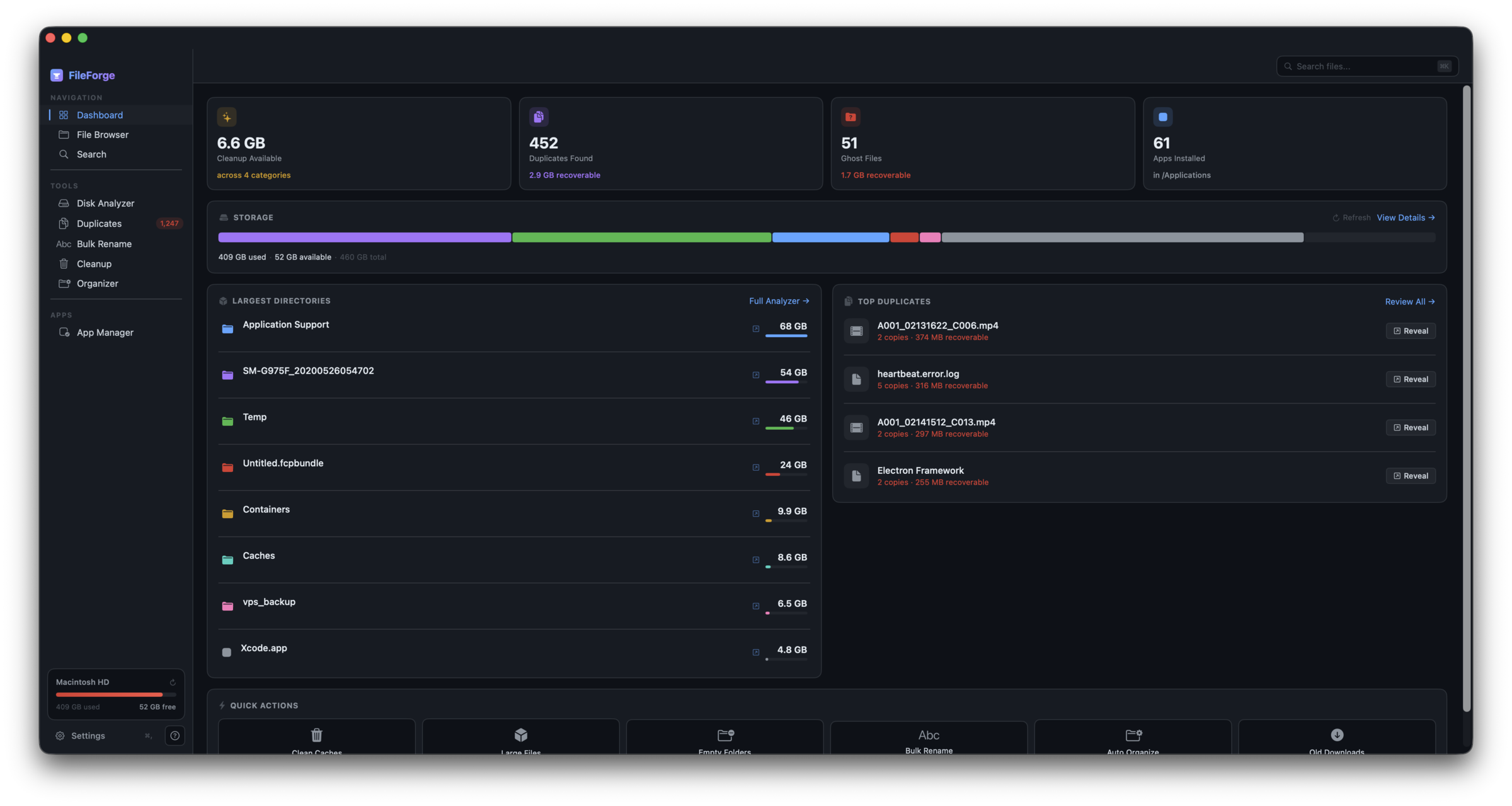
FileForge finds duplicates, ghost files, and digital clutter — and tells you exactly what's safe to delete. No subscriptions. No scary warnings.
Apple's Storage meter shows vague categories like System Data: 40 GB.
Most cleanup apps either don't do much — or ask you to trust them to delete things from your Library.
FileForge shows you exactly what's there, and only suggests deleting what's safe.
Everything most Mac cleanup tools do separately — unified, safe, one price.
Hash-based detection catches true copies even when the filename changed. Set a minimum size, pick newest or oldest to keep, preview every match before deleting.
Every category labeled Safe or Review. Risky items require expanding the file list first. No surprise deletions.
Leftovers from apps you uninstalled months ago. Uses Launch Services API to find true orphans — not false positives other tools miss.
Treemap + drill-down.
Auto-sort by rules. Undo.
Chain rules. Live preview.
Clean uninstalls.
FileForge analyzes your disk, finds duplicates, hunts ghost files, and categorizes everything. Scans run in the background — you can start using the app immediately.
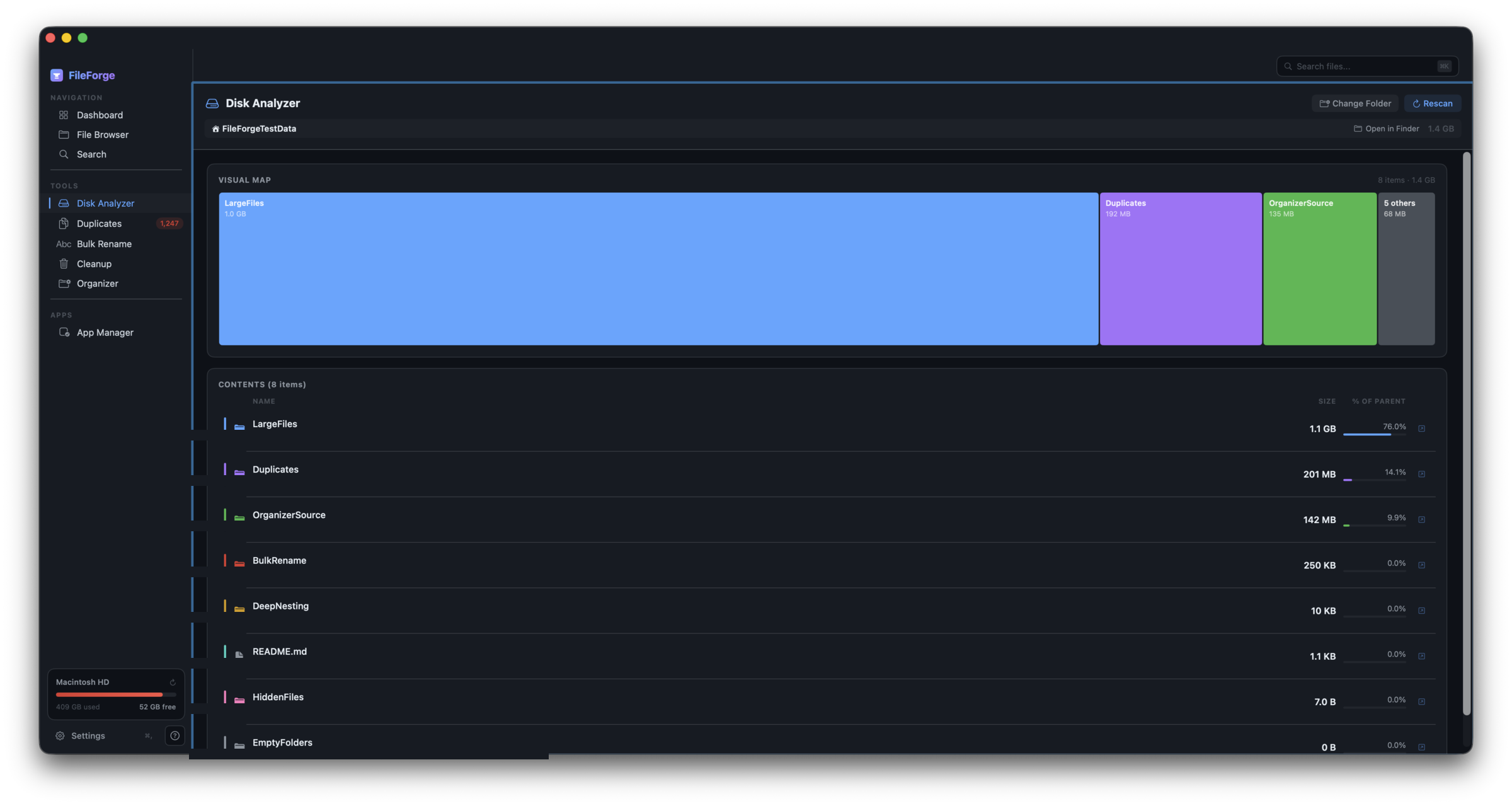
See exactly what will be deleted before you commit. Every item has a Safe or Review badge. Expand any category to pick individual files.
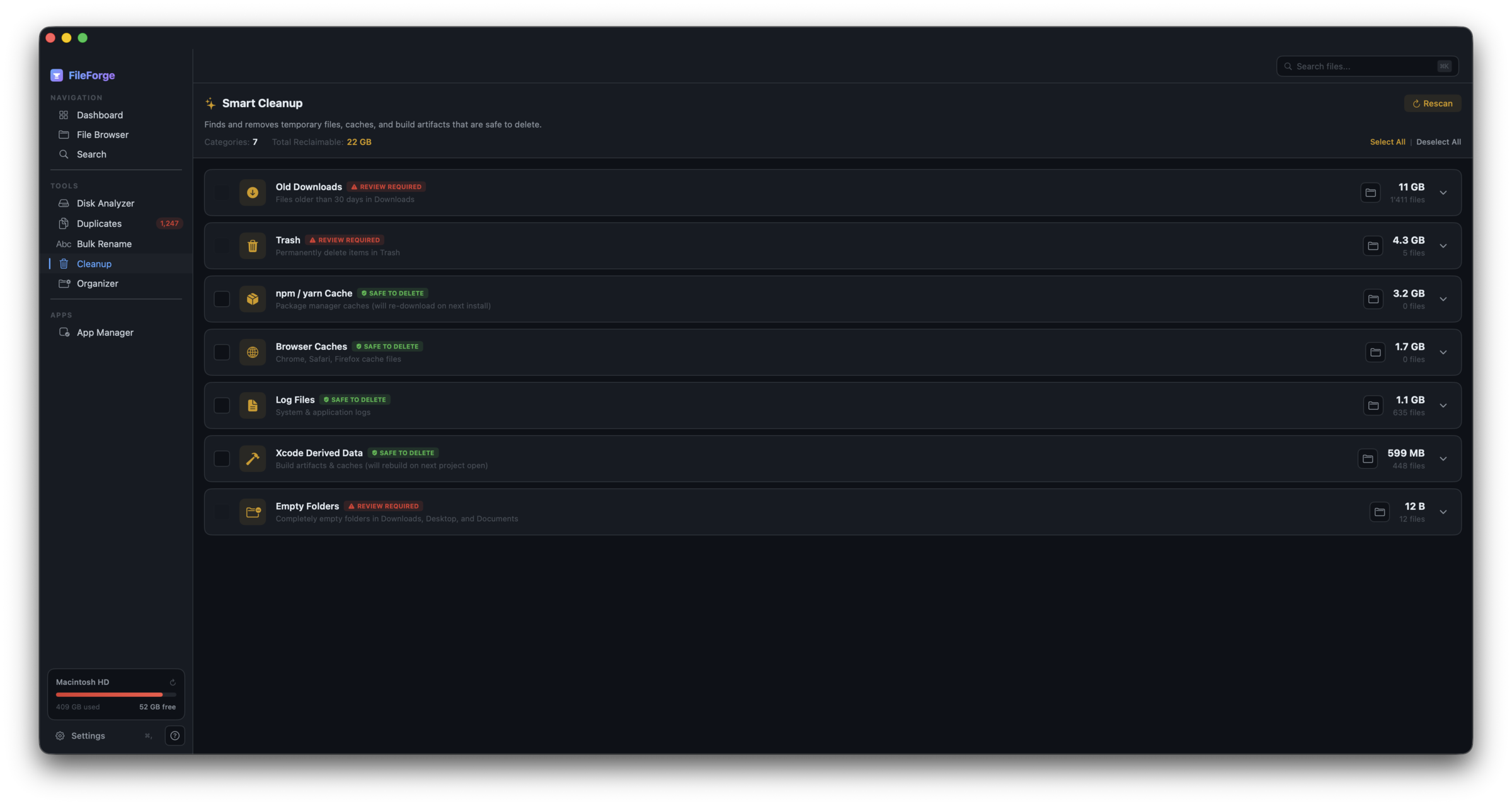
One click to move selected items to Trash — recoverable for 30 days. Undo anything with ⌘Z. No permanent deletes unless you explicitly empty the Trash.
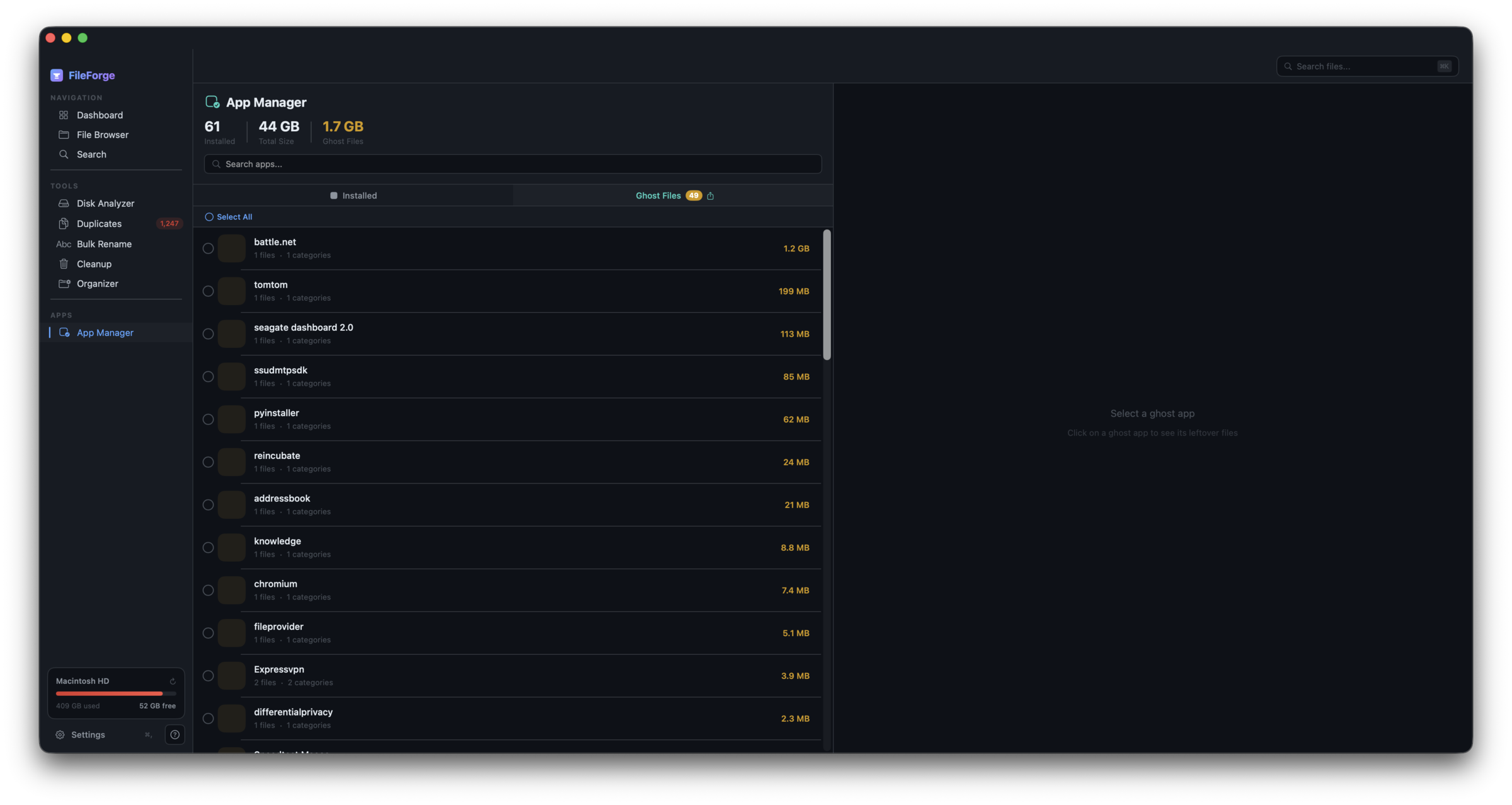
 FileForge
|
CleanMyMac X
$35/year
|
DaisyDisk
$10 once
|
dupeGuru
Free
|
|
|---|---|---|---|---|
| One-time purchase | ✓ | — | ✓ | ✓ |
| Beginner-safe defaults | ✓ | — | ✓ | — |
| Duplicate finder | ✓ | Limited | — | ✓ |
| Ghost file detection | ✓ | Limited | — | — |
| Bulk rename | ✓ | — | — | — |
| File organizer | ✓ | — | — | — |
| No subscription | ✓ | — | ✓ | ✓ |
| Malware scanner | By design ↓ | ✓ | — | — |
| "Speed up" / RAM purge | By design ↓ | ✓ | — | — |
| Browser privacy cleaner | Roadmap | ✓ | — | — |
Mac cleanup apps have gotten bloated. Here's what we intentionally left out — and the honest reason why.
macOS has XProtect and Gatekeeper built in. Real antivirus needs a signatures database updated daily — that would become the entire product. We'd rather do cleanup well than cleanup plus bad AV poorly.
Modern macOS manages memory itself. Freeing RAM just forces the kernel to rebuild caches you'll need again seconds later. It's theater that makes Macs slower. We won't ship placebos.
Apple's nightly, weekly, and monthly cron scripts run automatically on every modern Mac. Onyx (free) handles edge cases. Bolting this on pads the feature list but helps nobody.
That's Homebrew's job (brew upgrade), or the App Store's. Building our own third-party app updater means conflicts with existing updaters and endless maintenance. (FileForge itself updates normally via the in-app updater — this is about other apps on your Mac.)
Competitors promise to "make your Mac faster" through boot optimization, RAM tricks, or maintenance voodoo. On modern Macs, performance is hardware-bound. We won't sell placebos — even though adding the claim to our marketing would be easy.
Some cleanup apps pop up every few launches reminding you to renew, upgrade, or buy their sibling products. FileForge is a one-time purchase and stays out of your way. No banners, no modals, no "subscribe to unlock."
Pay once. Own it forever. Try the free tier first — no card required.
1 Mac
Up to 5 Macs
v1 ships today. These land in the next few releases — free for everyone with a launch license.
Two folders side-by-side, drag files between them. The classic Commander workflow for power users.
Multiple folders open at once. Switch between projects without losing your place.
⌘K anywhere — type "move", "zip", "terminal", "new folder". Keyboard-first navigation.
"Remind me every Sunday" or auto-run Smart Cleanup in the background. Stay ahead of the mess.
See how your disk usage changes over weeks. Spot the apps silently eating space before you run out.
Save any filter as a virtual folder. "Files over 1 GB" or "Untouched in 2 years" always at your fingertips.
See everything that auto-launches at boot — launch agents, daemons, login items. Disable what you don't need. Stop wondering why your Mac is slow on startup.
Plug in a USB drive or backup SSD and scan it for duplicates, cleanup, and disk analysis. Works with any mounted volume.
Find near-duplicate photos — screenshots of the same thing, burst shots, resized versions of one image. Uses perceptual hashing, not just byte-for-byte matching.
No. Pay once, use forever. Updates for the current major version are free. If you want v2.0 in the future, it'll be a discounted paid upgrade.
FileForge is a native Apple Silicon app — it runs on any Mac with an M1, M2, M3, or later chip on macOS 14 (Sonoma) or newer. Intel Macs aren't supported.
Never. Every destructive action shows a confirmation. Files go to macOS Trash (recoverable 30 days), not permanently deleted — except when you explicitly empty the Trash.
Not yet. App Store sandboxing breaks some features (full disk scanning, ghost file detection). A sandboxed version may ship there later with reduced functionality.
Your license covers 1 Mac (Pro) or up to 5 Macs (Family). Deactivate from Settings to free a slot and move to another Mac.
No telemetry. No analytics inside the app. The only data that leaves your Mac is your Paddle purchase (handled by Paddle, not us).
Yes — the free tier works forever, no time limit, no card required. You get real cleanup, duplicate scanning, and app uninstalls up to the free-tier caps. Most people know within a session whether FileForge is for them before they ever consider upgrading.
By design. We think those features are either bloat or placebo on modern Macs, and bundling them would dilute what we're actually good at. See What FileForge won't do above for the full reasoning — we're honest about what we skip, and why.
Refunds are handled by Paddle (our payments provider) under their standard buyer terms, which include your statutory rights under EU, UK, California, and other consumer law. If you hit an issue, email support@fileforgeapp.com — we'll help directly or point you to Paddle.
Launch price $9.99. No subscription. Free tier available if you want to try before buying.